
Marriage Biodata Excel Format - Free .xlsx Download
Two things people search for when they look for a marriage biodata Excel format: a single biodata to fill in and share, and a spreadsheet to compare multiple proposals. Both are covered here. The free .xlsx template downloads instantly - no account needed.
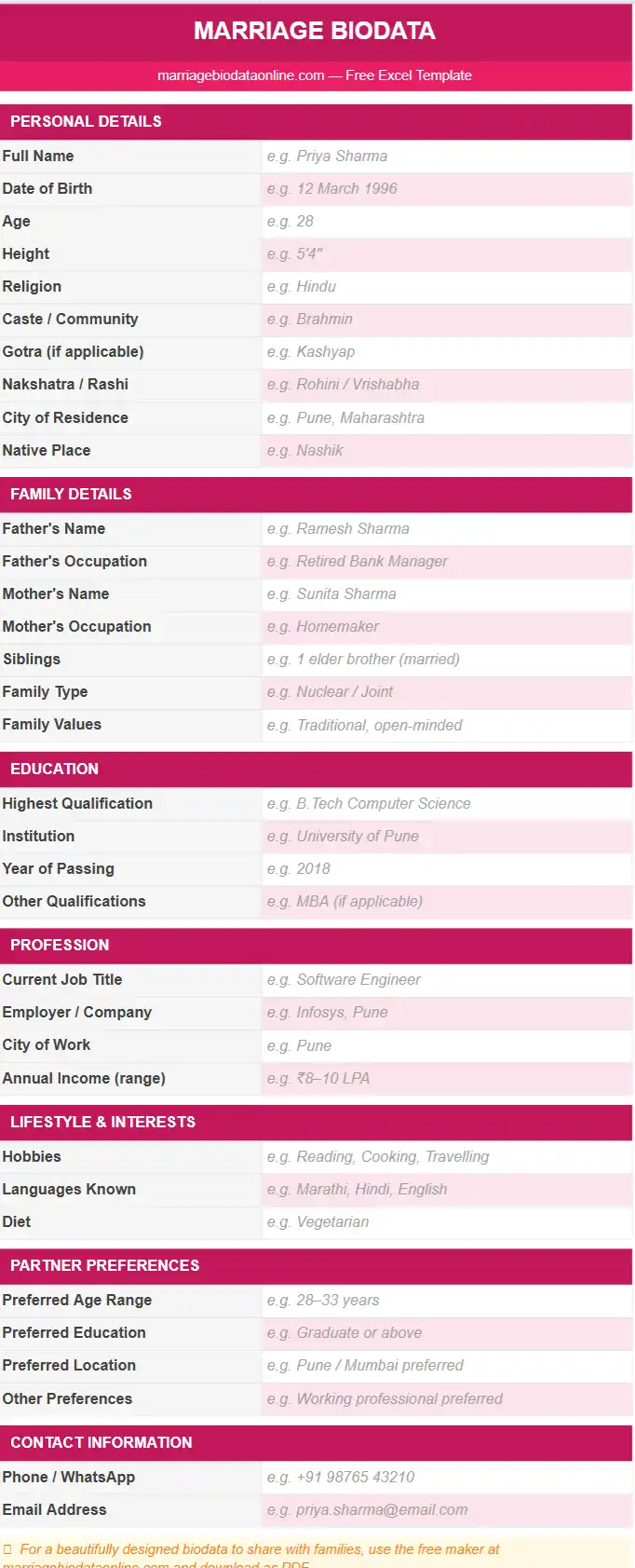
Single Profile Template
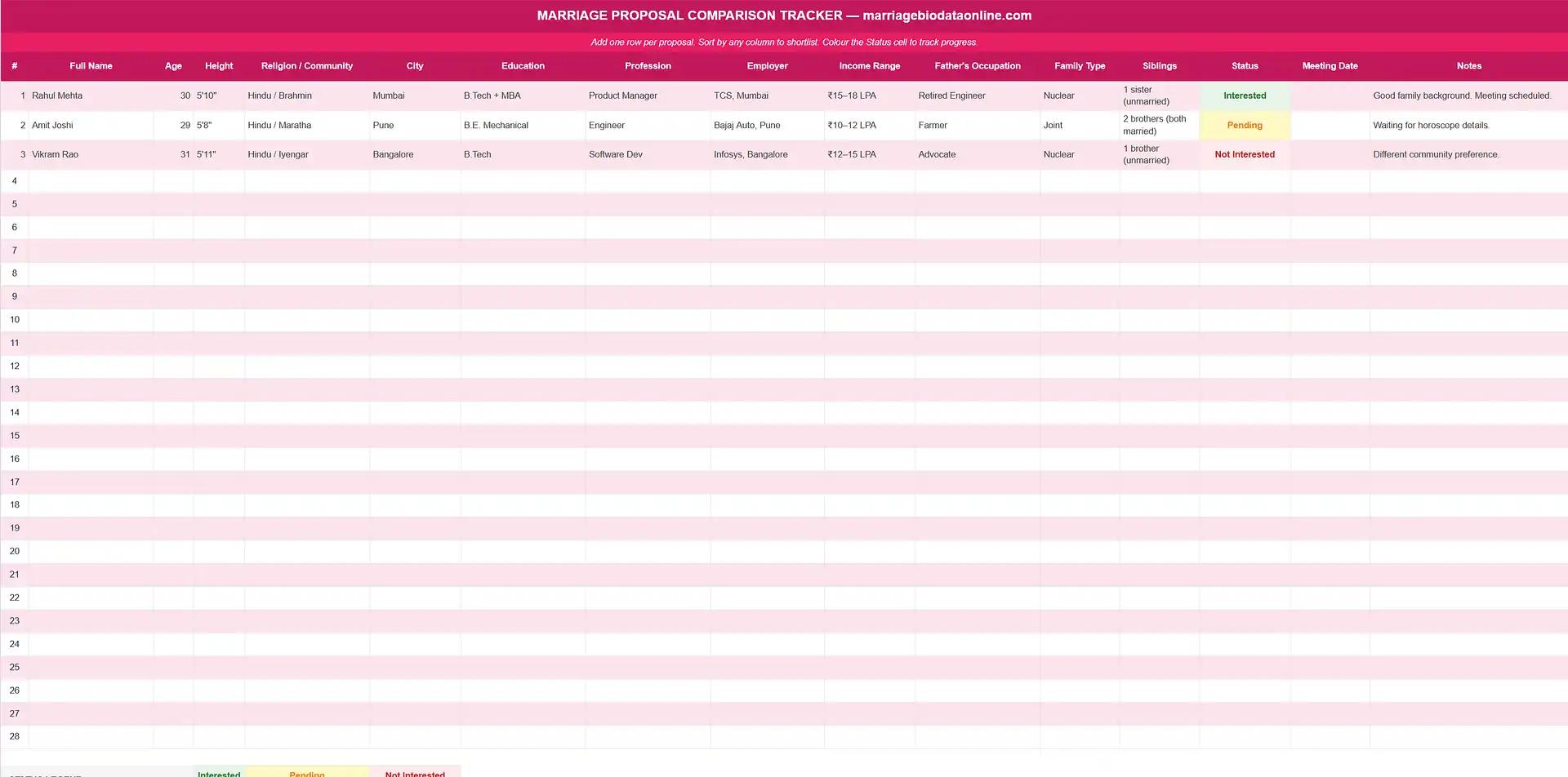
Comparison Tracker Sheet
Free Marriage Biodata Templates - Download as PDF or Word
These templates are designed for sharing. Pick one, fill in your details, and download as PDF or Word. Excel format is available at the download step.


Excel for Marriage Biodata - When It Makes Sense
Excel is not the best format for a single marriage biodata. A biodata that you create, print, and share with families is better as a PDF - it looks polished, opens on every phone, and cannot be accidentally edited. If that is what you need, use the online maker above and download as PDF or as a marriage biodata in Word format .
Excel becomes the right tool for marriage biodata in two situations: when a family or a marriage broker is managing and shortlisting several proposals at once, and when someone wants a plain structured file they can fill in offline and print without any design tool.
The free biodata Excel format download on this page covers both. There is a single-profile template with all the standard sections - personal details, family, education, profession, and partner preferences - and a separate comparison tracker sheet for managing multiple proposals side by side.
What Is in the Marriage Biodata Excel Template
The .xlsx file has two sheets. The first is a biodata format in Excel for a single person - the same sections as a standard marriage biodata, laid out in a clean table structure:
- Personal Details - name, date of birth, height, religion, community, city
- Family Details - parents' names and occupations, siblings, native place, family type
- Education - highest degree, institution, year
- Profession - job title, employer, city, income range
- Partner Preferences - age range, education, location, values
- Contact Information - phone, WhatsApp, email
The second sheet is a biodata comparison tracker. Each row is one candidate. The columns map to the same fields as the single-profile sheet - so you can scan 10 or 20 proposals side by side, sort by age or location, and add your own notes column. This is the primary reason families and pandits ask for a marriage biodata in Excel format.
Both sheets are fully editable. There are no locked cells, no macros, and no password protection. The file opens in Microsoft Excel, Google Sheets, and LibreOffice Calc.
Excel vs Word vs PDF - Which Format to Use
All three formats are available from the free biodata maker on this site. The right choice depends on what you are doing with the file.
| Format | Best For | Opens In |
|---|---|---|
| Sharing on WhatsApp, uploading to Shaadi.com or BharatMatrimony, printing | Every phone and computer | |
| Word (.docx) | Editing after download, offline filling, keeping a master copy to update over time | Microsoft Word, Google Docs, WPS Office |
| Excel (.xlsx) | Comparing multiple proposals, managing a shortlist, plain data entry without design | Microsoft Excel, Google Sheets, LibreOffice Calc |
If you are creating a biodata to share, use PDF. If you want to edit it later or hand it to someone else to fill in, use Word format . Excel makes sense only when you are managing data across multiple profiles - not for a single biodata you are sending to families.
To see what a finished, well-formatted biodata looks like before you decide on a format, see the sample marriage biodata page.
How to Use the Marriage Biodata Excel Format
- 1. Download the .xlsx file. Click the download button at the top of this page. The file saves to your device immediately - no account, no email address required.
- 2. Open in Excel, Google Sheets, or LibreOffice. The file opens in any spreadsheet application. On a phone, open it in Google Sheets or the Microsoft Excel app. On a computer, any version of Excel from 2010 onwards works.
- 3. Fill in Sheet 1 - Your Biodata. Type your details into the labelled cells. Personal details, family background, education, profession, partner preferences, and contact information. All cells are editable.
- 4. Use Sheet 2 for comparison (optional). If you are reviewing multiple proposals, paste each person's details into a new row in the comparison sheet. Add a notes column for your own comments. Sort by any column - age, location, qualification - to shortlist.
- 5. Print or share. To share a single biodata from the Excel file as a PDF, use File → Save As → PDF in Excel or Google Sheets. Or use the online maker at the top of this page to create a beautifully designed marriage biodata as a PDF that looks far more polished than an Excel printout.
What a Marriage Biodata Excel Sheet Should Include
Whether you are building your own biodata Excel format or filling in a downloaded template, the required fields are the same as any standard marriage biodata. The difference is layout: in Excel, each field gets its own row or cell rather than a designed section.
For a single-profile biodata Excel sheet, include:
- Name, date of birth, age, and height
- Religion, community or caste, and gotra (if Hindu)
- City of residence and native place
- Father's name and occupation, mother's name and occupation
- Number of siblings, with their marital status
- Family type (joint or nuclear)
- Highest qualification and institution
- Current job title, employer, city, and income range
- Partner preference - age range, location, education, values
- Contact: phone, WhatsApp, email
For a comparison tracker sheet, use the same fields as column headers and one row per proposal. Add a "Status" column (Interested / Pending / Not Interested) and a "Notes" column for free-text observations. This structure lets a family manage 20 or 30 proposals without losing track.
To understand how these sections fit together in a well-designed biodata, see the complete guide to making a marriage biodata .
Frequently Asked Questions
Is Excel the right format for a marriage biodata?
For a single biodata that you are sharing with families, no. Excel does not produce a polished, designed document - it prints as a plain grid. Use PDF for sharing, or Word if you need to edit it. Excel works well when you are managing and comparing multiple proposals, not when you are creating your own biodata to send out.
Can I open the .xlsx file on my phone?
Yes. Download the file and open it in the Microsoft Excel app or Google Sheets on Android or iPhone. Both are free and handle .xlsx files without any issues. On Google Sheets, the file opens directly in your browser without installing anything.
How do I use Excel to compare multiple marriage proposals?
Use the comparison tracker sheet included in the downloaded Excel template. Each row is one proposal. Columns cover all the standard fields - name, age, education, profession, family background, and contact details. Add a Status column (Interested / Pending / Not Interested) and a Notes column. Sort by age or location to shortlist. This format is used by families managing 10–30 proposals at a time and by pandits and marriage brokers tracking candidates across multiple families.
Can I convert the Excel biodata to PDF after filling it in?
Yes, but the result will look like a spreadsheet, not a biodata. In Microsoft Excel: File → Save As → PDF. In Google Sheets: File → Download → PDF. For a properly designed biodata to share with families, you are better off using the free online maker on this site - fill in the same details, choose a template, and download as a marriage biodata PDF that looks far better than an Excel-to-PDF export.
What is the difference between a biodata Excel format and a biodata Word format?
Word (.docx) is a document editor - it produces a formatted, printable page with fonts, colours, and a photograph, similar to what the PDF version looks like. Excel (.xlsx) is a spreadsheet - data in rows and columns, no design, no photo integration. The marriage biodata Word format is the right choice for a single biodata. Excel is for managing multiple proposals as data.
Is the Excel biodata template free to download?
Yes, completely free. No account, no signup, no payment. Click the download button at the top of the page and the .xlsx file saves to your device immediately. Both sheets - the single-profile template and the comparison tracker - are included in the same file.
Can I add more fields to the Excel biodata template?
Yes. All cells are unlocked and editable. Add rows for additional fields - horoscope details like gotra, nakshatra, and rashi for Hindu families; maslak and sect for Muslim families; or any other community-specific information. For the comparison tracker, add
Create a Designed Marriage Biodata - Free
The online biodata maker produces a far better result than an Excel template. Pick a design, fill in your details, and download as PDF or Word in minutes.
Create Biodata Free